
How to Command Kelvin in Sons of the Forest
Stand Kelvin up near the crash site, then pull out your notepad: it is the only way to give him orders. Pick Get for wood and stone, Build for fires and shelters, Stay or Take a break to park him.
- Orders on the notepad7Follow me, Get and Build and more
- Things he can get7logs, sticks, rocks and berries…
- Things he can build5fire, shelter and finish structure…
- Outfits for him65 pins on the map
Seven steps from waking him up to dressing him. The companions page puts Kelvin and Virginia side by side; Virginia takes no orders, see how to befriend Virginia.

On this page
The 7 steps at a glance
Steps 1 to 3 get the notepad working. Steps 4 to 6 are the orders you will use daily. Step 7 is his clothes.
- Stand Kelvin up. He lies hurt by the helicopter.
- Take out the notepad. It is the only line to him.
- Read the 7 orders. Follow me, Get, Build, Stay, Take a break, Clear and Take clothing.
- Send him to Get things. 7 things, 4 ways to hand them over.
- Have him Build. fire, shelter, finish structure, repair structure and clear shelter.
- Park him and clear ground. Stay, Take a break and Clear.
- Dress him. 6 outfits, 5 of them on the map.
Step 1: Stand Kelvin up
He is there from the start: after the crash he lies hurt near the helicopter. Walk up and help him to his feet, and he works with you from then on. The beginner guide puts this in the first hours. Players say you hold the interact button next to him to raise him, and that he is mute and confused until the notepad is out.
Step 2: Take out the notepad
Kelvin flew in with you. The crash left him deaf and unable to speak, so you give him orders in writing on your notepad. He gathers, builds and keeps your camp running, but he does not fight. Players report the order list lives on the notepad and that E opens it once he is with you (Corrosion Hour).
- Take out the notepad. Players say this is what starts the communication.
- Stand in front of Kelvin and press E, the key players report, to open the order list (Gamer Guides).
- Pick an order. Some open a second menu (Step 3).
Not in the files
The key bindings are not in the string table we hold. E is the key players report on keyboard; your bindings may differ.
Step 3: Read the 7 orders
The names are the game's own (the Robby string table). The menu layout and what each order does follow the Fandom wiki, paraphrased.
| Order | What it does | Second menu |
|---|---|---|
| Follow me | He walks with you. | none |
| Get | He gathers a resource, then delivers it. | What: logs, sticks, rocks, berries, fish, arrows and radio; Then: fill holder, drop here, give to me and follow me |
| Build | He builds or tidies a structure. | What: fire, shelter, finish structure, repair structure and clear shelter |
| Stay | He waits where you tell him. | Where: here, at shelter and hidden |
| Take a break | Gives him a break from work. | none |
| Clear | Clears an area — you pick the radius. | Radius: 5, 10 or 20 meters |
| Take clothing | Hands him an outfit you have found — this is how you change his clothes. | none |
Step 4: Send him to Get things
Get is the order for gathering. You pick what, then what he does with it: fill holder, drop here, give to me and follow me.
- Choose Get and then logs, sticks, rocks, berries, fish, arrows and radio.
- Choose where it goes. Players say storage is the best choice, but only if you built a storage structure for that item; "drop here" leaves it where he stands (Corrosion Hour).
- Wait for the thumbs-up, which players say means he finished his last job.
Pro tip
Build log, stick and rock storage first (a Log Storage costs 8 sticks and a Stick Storage 6 in the crafting data), then send him for that resource.
Step 5: Have him Build
Build lists 5 jobs: fire, shelter, finish structure, repair structure and clear shelter. Players say he gathers the materials himself and does not wait for you (Corrosion Hour).
- Place a blueprint yourself (a shelter or a fire), or choose Build and let him start one.
- Use Finish structure to have him complete a blueprint you laid out.
- Use Repair structure to have him mend one, and Clear shelter to take one down.
Step 6: Park him and clear ground
Stay has three places: here, at shelter and hidden. Take a break lets him rest. Clear removes brush in a radius you pick: 5, 10 or 20 meters, per the wiki.
- Players say Kelvin will not follow you into caves, so park him at camp with Take a break before you go down.
- Use Take a break regularly: players say he loses motivation if overworked.
- Keep him away from the fights. He backs away from them and returns afterwards (companions page).
Step 7: Dress him
Take clothing hands him an outfit you have found. The wiki lists 6 for him, counting the Tactical Jacket he starts in, and says they are cosmetic. Our map marks 5 of the pickups: Pyjamas, Leather Jacket, Blazer, Hoodie and Tuxedo.
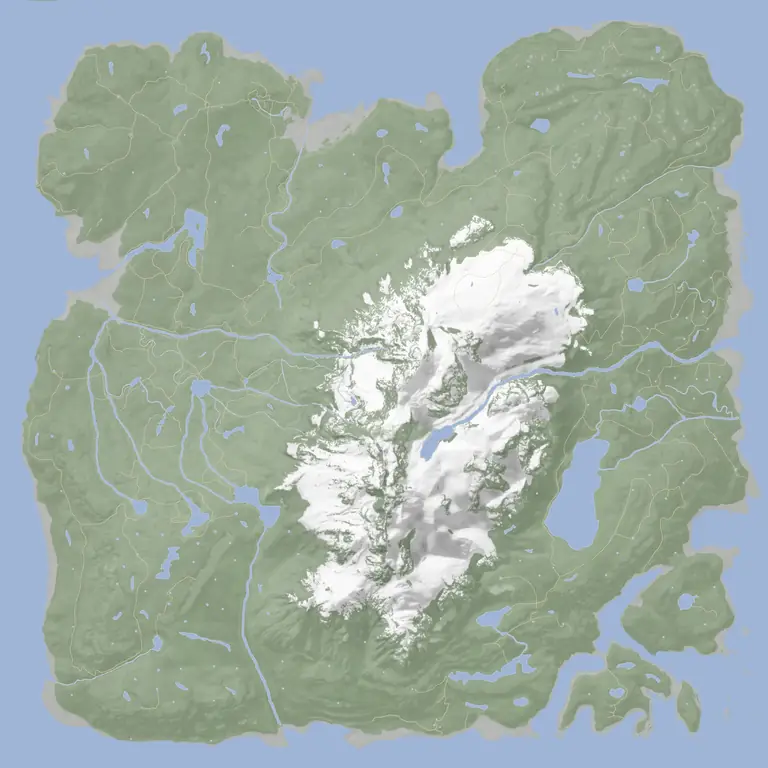
Tap a dot to see which place it is. Open a layer on the full map: Kelvin's outfits




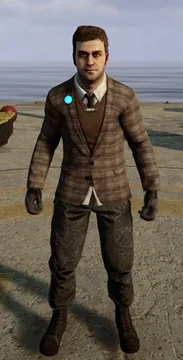

Orders in the files that no guide places
The game's string table holds 7 more words that the wiki menu does not use: perimeter wall, fill sled, reset traps, stones, spears, maintain base and sharpen wall. They look like extra orders (a sled to fill, traps to reset, walls to sharpen), but we have not seen them in a menu, so we do not claim they work.
Common mistakes
- Using "drop here". He may drop things where you do not want them. Use storage or "give to me".
- Never giving him a break. Players say he stops working.
- Leaving him alone near a fight. He cannot defend the base.
- Expecting weapons. Take clothing is for clothing only, per players.
FAQ
How do you give Kelvin orders?
With the notepad. Take it out, face him and pick an order; players say E opens the list.
What orders can Kelvin follow?
Follow me, Get, Build, Stay, Take a break, Clear and Take clothing. Get, Build, Stay and Clear open a second menu.
Can Kelvin die?
Enemies knock him down but cannot kill him, and only you can kill him, per the wiki. If he is down, help him up.
Can Kelvin fight?
No. He backs away from fights and returns when they are over.
How do you change Kelvin's clothes?
Use the Take clothing order with an outfit in your inventory. The wiki lists 6: Tactical Jacket, Leather Jacket, Tuxedo, Hoodie, Blazer and Pajamas.
Does Kelvin follow you into caves?
Players say he does not, so leave him at camp with Take a break.
Pages to keep open
Related pages
Sources
- Sons of the Forest on Steam (build read: client 53951 and dedicated server)
- Sons of the Forest Wiki (Fandom): Kelvin (CC BY-SA 3.0, paraphrased)
- Sons of the Forest Wiki (wiki.gg): Kelvin
- Gamer Guides: surviving your first night
- Corrosion Hour: Kelvin companion guide
- 4NetPlayers: Kelvin and Virginia guide
PinDrop is fan-made and not affiliated with Endnight Games.